कंटेंट पाइपलाइन
ContentFlows आपके schedule पर एक पूरी तरह से automated content pipeline चलाता है। Generation से लेकर publishing तक ठीक-ठीक क्या होता है — और आप कहाँ नियंत्रण में रहते हैं — यह यहाँ बताया गया है।
अवलोकन
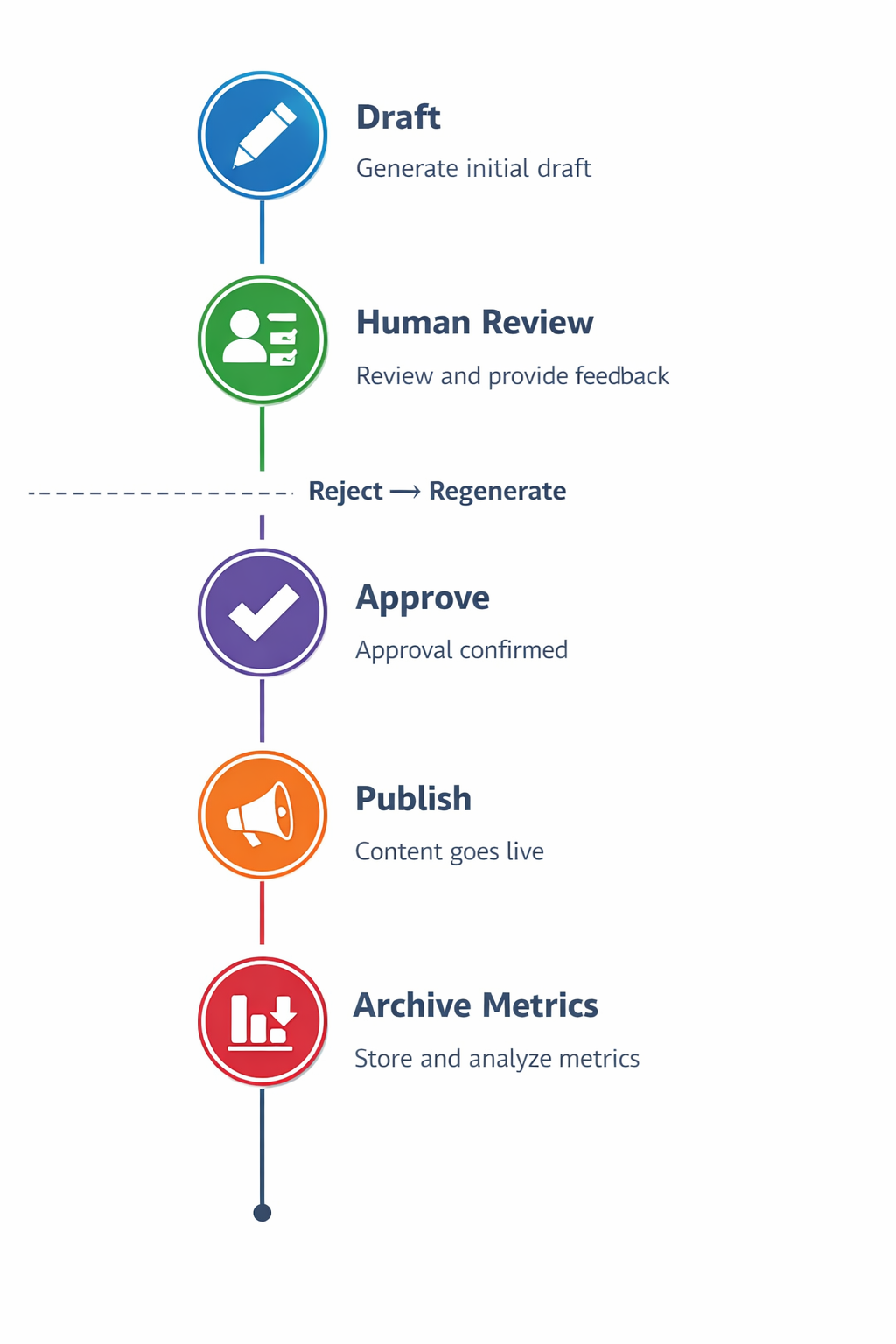
पाइपलाइन में चार चरण हैं:
- Generate — AI आपके brand config और एक scheduled trigger का उपयोग करके content लिखता है।
- Review — content अनुमोदन के लिए आपको email की जाती है।
- Approve — आप अपने inbox में approve (या reject) पर क्लिक करते हैं।
- Publish — अनुमोदित content आपके सभी connected channels पर अपने आप पब्लिश होती है।
कंटेंट के प्रकार
ContentFlows चार प्रकार के content जनरेट करता है:
Newsletters
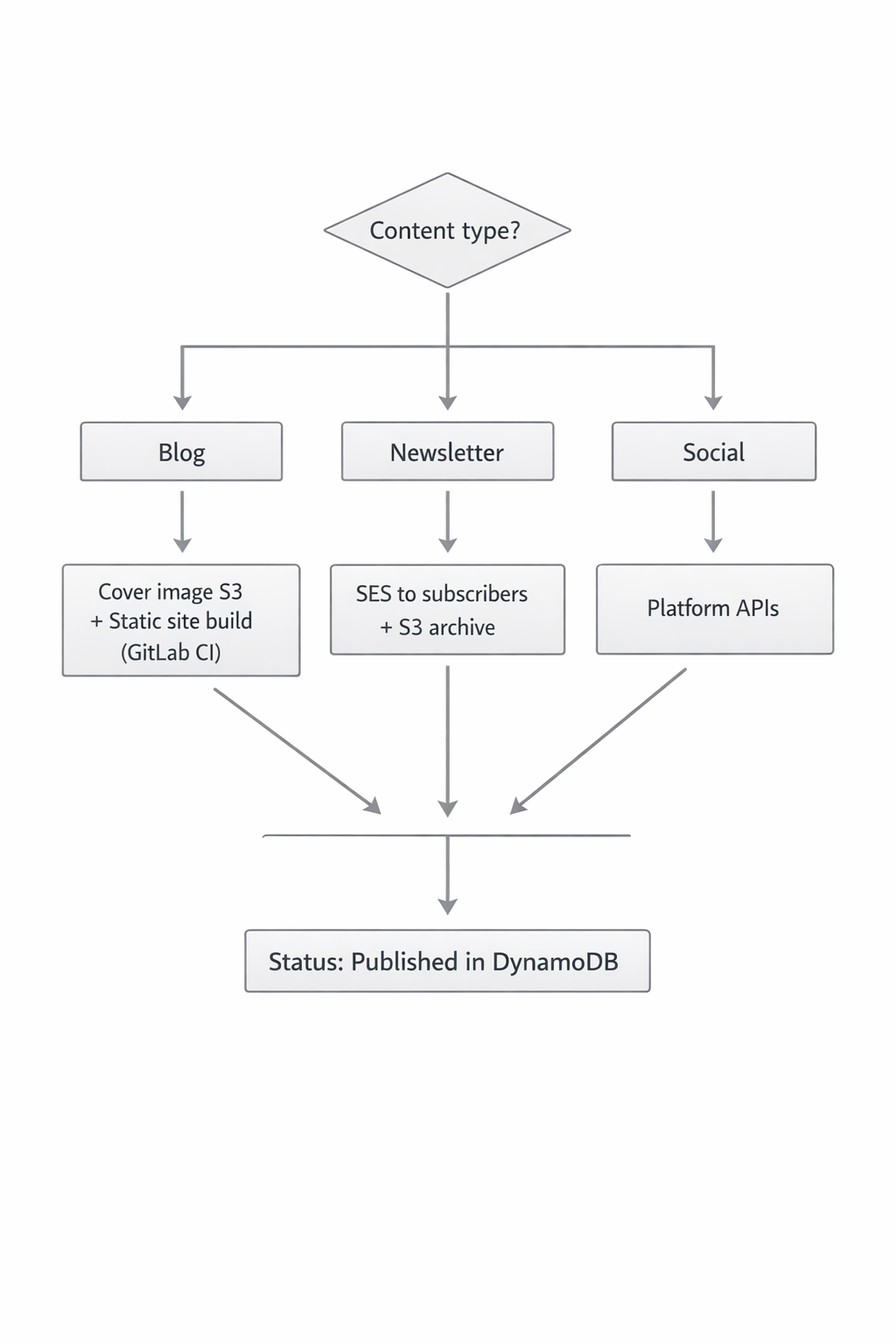
Amazon SES के माध्यम से आपकी subscriber list पर भेजी गई पूर्ण HTML email newsletters। इसमें एक spotlight section, key takeaways, “Did You Know” sidebar, founder note, और एक CTA शामिल है। AI-generated hero image शामिल है।
Blog posts
आपके content topics पर long-form articles (700–900 words)। Markdown में formatted, और एक cover image AI द्वारा जनरेट की गई। अनुमोदन के बाद, blog posts आपकी content library में दिखाई देते हैं।
Social posts
LinkedIn, Facebook, और Instagram के लिए platform-specific posts। हर एक अपने platform के लिए सही tone और character limits के साथ स्वतंत्र रूप से जनरेट होता है। LinkedIn posts अधिक professional होते हैं; Instagram captions सुझाए गए hashtags के साथ conversational होते हैं।
Documents (on demand)
अनुरोध पर जनरेट किए गए long-form documents: workout plans, SOPs, case studies, guides। dashboard से manually या document generator के माध्यम से ट्रिगर किए जाते हैं।
Scheduling
ContentFlows एक configurable schedule पर चलता है। आपका plan यह निर्धारित करता है कि प्रति month कितना content जनरेट होगा:
- Starter — 4 newsletters + 4 blogs + 12 social posts / month
- Pro — 8 newsletters + 8 blogs + 24 social posts / month
- Business — unlimited
Scheduler अपने आप चलता है। Generation शुरू करने के लिए आपको लॉग इन करने की आवश्यकता नहीं है।
अनुमोदन प्रक्रिया
Content live होने से पहले हर content पीस account के admin email पर भेजी जाती है। Approval email में शामिल होता है:
- पूरे content का preview
- एक Approve button — एक क्लिक, लॉगिन की आवश्यकता नहीं
- एक Reject button — इसे regeneration के लिए वापस भेज देता है
Approval links single-use होते हैं और 7 days के बाद expire हो जाते हैं। यदि लिंक expire हो जाए, तो आप अपने dashboard के Content टैब से generation फिर से ट्रिगर कर सकते हैं।
अनुमोदन पर क्या होता है
जब आप Approve पर क्लिक करते हैं:
- Content status आपकी queue में Approved के रूप में अपडेट हो जाता है।
- ContentFlows तुरंत उस content type के लिए उपयुक्त सभी connected channels पर पब्लिश करता है।
- Newsletters के लिए: email आपकी पूरी subscriber list को भेजी जाती है।
- Social posts के लिए: पोस्ट LinkedIn, Facebook, और/या Instagram पर एक साथ live हो जाती है।
- आपके admin address पर एक confirmation email भेजी जाती है।
अस्वीकृति पर क्या होता है
जब आप Reject पर क्लिक करते हैं, तो content discard कर दी जाती है और ContentFlows regeneration शेड्यूल करता है। आप चाहें तो एक reason शामिल कर सकते हैं — इसका उपयोग अगली generation कोशिश के लिए संकेत के रूप में किया जाएगा (जल्द आ रहा है)।
Content dashboard
आपके dashboard का Content टैब दिखाता है:
- पूरी content queue (generated, pending approval)
- Published content history
- Rejected items
- Manual generation trigger
[DIAGRAM: Content tab — queue list → item detail → action buttons (approve, reject, view)]
Content dashboard tab का screenshot यहाँ जाएगा।
AI images
ContentFlows हर उस content पीस के लिए एक AI image जनरेट करता है जिसे इसकी आवश्यकता होती है:
- Newsletter hero image
- Blog post cover image
- Social post visual (for Instagram)
Images आपके brand के industry और content topic को context के रूप में उपयोग करके जनरेट की जाती हैं, और आपके private S3 bucket में stored होती हैं tenants/{your-id}/images/.